The Problem
AI Task Automation solved the input side: turning text and voice into structured tasks and projects in Notion. But once tasks lived there, checking them back was still cumbersome. Notion’s native view didn’t give enough clarity to answer simple, everyday questions: what do I have to do today? this week? what’s overdue?
I needed a query and management layer just as fast as the input one: something I could open from my phone, with no logins or database navigation, that also let me mark tasks as done without leaving the conversation.
The Solution
Second Brain AI Assistant is a Telegram bot, also built with n8n, that acts as an interface over the same Notion task and project base. Unlike Part 1, no language model is involved here: it’s a command-and-button system that routes user interaction to the right subflow.
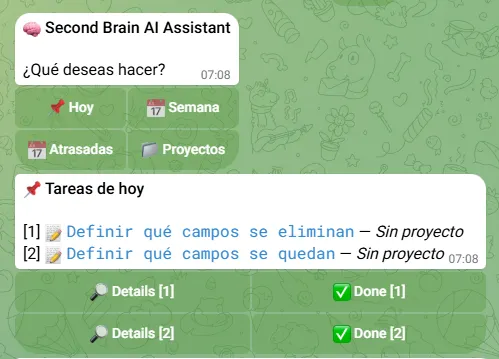
The bot offers a main menu with four views — Today, Week, Overdue, and Projects — and, inside the task list, a detail button and a mark as done button for each task, all through Telegram inline buttons.
Stack and Architecture
Also built on self-hosted n8n, using the Telegram API as the conversational interface and the Notion API as the data source — the same task and project base that feeds Part 1.
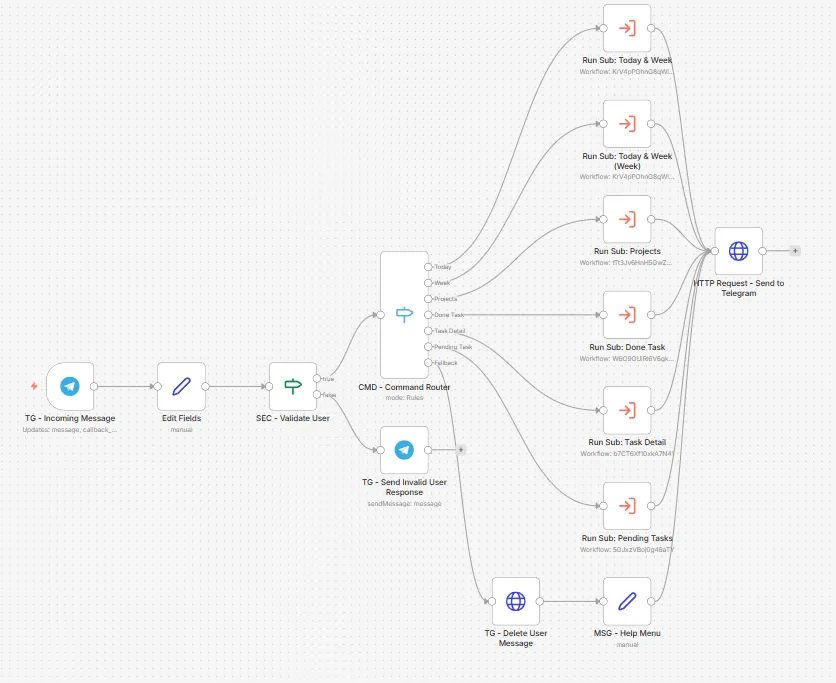
- Main flow as a router: receives every Telegram message or button tap, validates the user, and decides which subflow should handle the request.
- User validation: a security step checks that the sender is the authorized user before touching any data; otherwise it replies with an invalid-access message and stops.
- Independent subflows per action: each function (listing tasks, marking one done, listing projects, viewing a detail) lives in its own n8n subflow, called from the main router.
- Direct HTTP request to Telegram: instead of the native Telegram node, replies are sent through a hand-built HTTP request, so dynamic inline keyboards can be generated (a “Detail” and a “Done” button per task in the list).
- Temporary task cache: when a list is generated, the flow stores the data in n8n’s workflow static memory with an expiration time. So when the user taps “Detail” on a task they just saw, the bot replies with the already-fetched data instead of hitting Notion again — and if the cache has expired, it automatically falls back to a direct lookup by ID.
Flow Overview
- Input · Telegram Message — Receives the message or an inline button tap.
- Security · User Validation — Checks that the sender is the authorized user; if not, stops the flow with a warning.
- Routing · Command Router — Based on the command or button pressed, decides between Today, Week, Overdue, Projects, Task Detail, or Mark as Done.
- Subflow · Task Query — Builds the query, asks Notion for tasks in the requested range and, if there are none, also reports the available projects.
- Subflow · Task Detail — First looks up the task in the temporary cache; if missing or expired, fetches it by ID directly from Notion.
- Subflow · Mark as Done — Finds the task by ID and updates its status to “Done” in Notion.
- Subflow · Projects — Lists all active projects or, if a specific one is requested, its associated tasks.
- Output · Telegram Response — Each subflow formats its response and the main flow sends it with the matching inline buttons.
Key Features
- Quick-check menu: today’s, this week’s, overdue, and per-project tasks in a couple of taps.
- On-demand task detail: project, status, deadline, and a direct link to the Notion page.
- Mark as done from the chat, without leaving Telegram or opening Notion.
- Active project listing with its associated tasks.
- User validation so only the authorized person can read or modify the data.
- Temporary result caching for faster detail responses consistent with what was last shown.
- Dynamic inline buttons generated per task, instead of manual text commands.
Technical Challenges
- Building dynamic inline keyboards, with a pair of buttons (Detail / Done) for each task in a variable-length list, which required sending the response via a direct HTTP request instead of the native Telegram node.
- Reliably routing several distinct commands and buttons from a single entry point to independent subflows.
- Avoiding redundant Notion requests when the user asks for the detail of a task that was already shown seconds earlier, through a temporary cache with expiration and automatic fallback to a direct lookup.
- Restricting access to the owner only, so task and project management isn’t exposed to anyone else who messages the bot.
- Keeping consistency between what the user sees in the list and what gets updated when a task is marked done, avoiding desynced state between Telegram and Notion.
Result
- Closes the full loop: AI Task Automation creates tasks by voice or text; Second Brain AI Assistant queries and manages them, all from Telegram.
- Replaces Notion for daily use on quick lookups: no need to open the app to know what’s due today or this week.
- Full management from the phone, including marking tasks done with zero friction.
- Self-hosted, same n8n architecture as the rest of the system, easy to extend with new views or commands.